
Fasoo Mac Client Installation and Deployment using JAMF
The following describes what is typically configured in JAMF to deploy the Fasoo Mac client. The intent is to explain the structure and purpose of each JAMF object, not to provide a step-by-step walkthrough, so administrators can align this with their own JAMF standards.
By utilizing options outlined below, administrators can integrate the Fasoo Mac client into their organization's existing deployment workflows, streamlining device management and data security.
High Level Deployment Flow
Prepare the Fasoo Mac Client Files
• Obtain the official Fasoo installer (.pkg) file from Fasoo
• Obtain the official Fasoo client (.dmg) payload from Fasoo
• If required by the environment, Fasoo can provide:
• A single consolidated installer package, or
• Supporting configuration files to be deployed alongside the installer.
Upload the Fasoo Installer PKG to Jamf
• This installs the Fasoo Installer app + helper tools
Upload the Fasoo Client DMG to Jamf
• Stored as a package or mounted during deployment
JAMF Policy executes in order
• Installs the PKG
• Mounts the DMG
• Triggers Fasoo Installer to install the client silently
JAMF Build recommendations
When deploying the Fasoo Mac client using JAMF, the configuration is best understood in terms of JAMF objects rather than a single linear workflow. The sections below outline the common packages, policies, and profiles that work together to complete the deployment.
A. Packages (JAMF Packages Section)
In most deployments, two separate packages are uploaded to JAMF:
1. FasooInstaller.pkg
• Signed and notarized
• Installs the Fasoo Installer application to: /Applications/Fasoo Installer.app
• Provides the base installer and required helper tools
2. FasooClient.dmg
• Contains the Fasoo Mac Client payload(s)
• Not installed directly by Jamf
• Staged locally and invoked by the Fasoo Installer application
Jamf natively supports both PKG and DMG formats, allowing this approach without repackaging or creating a combined installer.
B. Policy #1 – Install Fasoo Installer
Purpose
• Deploy the Fasoo Installer application and supporting components to the Mac.
Policy Actions
• Install Package: FasooInstaller.pkg
Scope
• Targeted Macs
Triggers
• Enrollment Complete
• Recurring Check-in
• Manual (commonly used for testing)
Execution: Standard JAMF package install
Once this PKG isinstalled, the app lives at: /Applications/Fasoo Installer.app
C. Policy #2 – Mount and Install Fasoo Client from DMG
Purpose
• Use the Fasoo Installer application to silently install the client payload contained in the DMG.
Policy Actions
• Install Package: FasooClient.dmg
• Run Script:
o Mount the DMG
o Invoke the Fasoo Installer silently
o Pass the DMG path or application bundle path as needed
Use a script like the following in the Scripts section of the policy:
-----------------------------------------------------------------------------
#!/bin/bash
DMG="/Library/Application Support/JAMF/FasooClient.dmg"
MOUNT_DIR="/Volumes/FasooClient"
INSTALLER_APP="/Applications/Fasoo Installer.app/Contents/MacOS/Fasoo Installer"
# Mount the DMG
hdiutil attach "$DMG" -nobrowse -quiet
# Ensure it mounted successfully
if mount | grep "$MOUNT_DIR" >/dev/null 2>&1; then
echo "DMG mounted successfully at $MOUNT_DIR"
# Run the Fasoo Installer silently against the mounted volume
"$INSTALLER_APP" --install-from "$MOUNT_DIR" --silent
# Unmount when done
hdiutil detach "$MOUNT_DIR" -quiet
else
echo "Failed to mount DMG"
exit 1
fi
exit 0
-----------------------------------------------------------------------------
? Key Notes for This Script:
hdiutil attachmounts the DMG.The Fasoo Installer binary is invoked with flags (e.g.,
--install-fromand--silent)Adjust these flags based on your installer’s actual silent install options.
After installation, the script detaches the DMG.
This approach keeps installer components modular.
D. Apply macOS Security & Privacy Permissions (Critical)
Before the Fasoo client can function correctly, Jamf must deploy the required macOS configuration profiles.
Full Disk Access (PPPC)
o Fasoo Installer
o Fasoo Event Monitor Extension
o L-Client
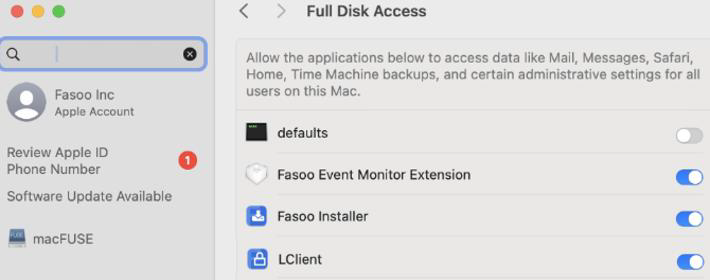
Endpoint Security Extension
o Fasoo Event Monitor
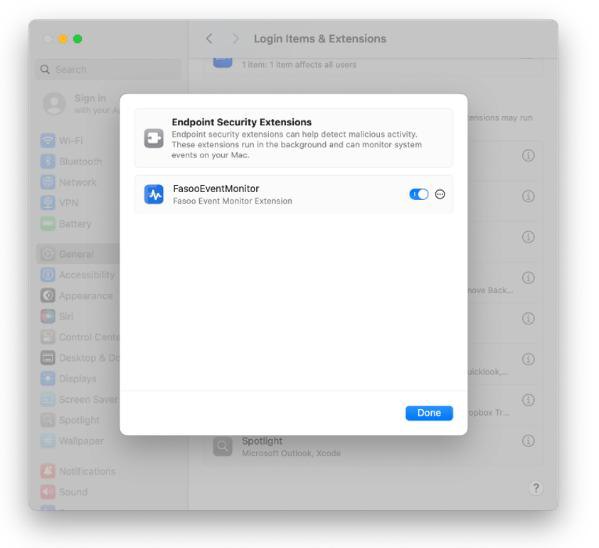
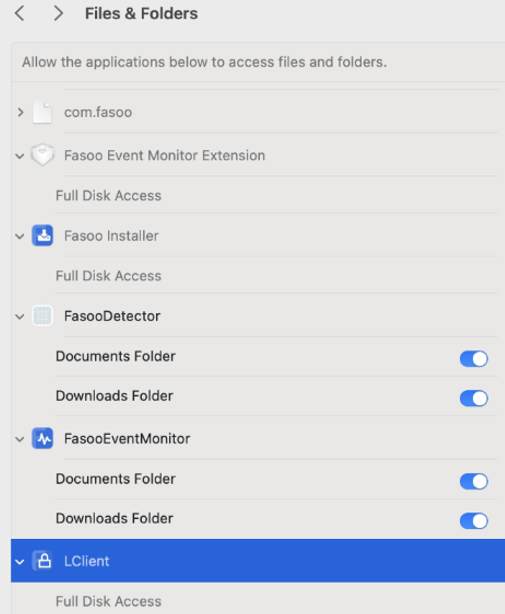
Files and Folders
o Fasoo Event Monitor
▪ Full Disk Access
o Fasoo Installer
▪ Full Disk Access
o Fasoo Detector
▪ Documents Folder
▪ Downloads Folder
o FasooEventMonitor
▪ Documents Folder
▪ Downloads Folder
o LClient
▪ Full Disk Access
E. Validation and Smart Groups
To support validation, reporting, and remediation, administrators typically configure:
Smart Groups
• Fasoo Client Installed
• Fasoo Installer Installed but Client Missing
These can be used to drive:
• Remediation or follow-up policies
• Deployment validation
• Reporting and status visibility for customers
Summary
Deploying the Fasoo Mac client with JAMF leverages JAMF’s native object-based model to provide a flexible and maintainable deployment approach. By separating packages, policies, and macOS configuration profiles into clearly defined components, administrators can align the deployment with existing Jamf standards while supporting validation, remediation, and ongoing management across managed macOS devices.